Invoicing · Client payments · Payouts
Invoice like
a company.
No company needed. Clients pay by card, bank transfer or crypto. You get paid your way, for one flat fee per paid invoice — never a percentage.
How it works
A company's invoicing.
None of the company.
You do the work and send the invoice from your iPhone. Remote Talent LLC issues it, collects the payment from your client, and sends your money where you want it — for one flat fee when the invoice is paid.
No company needed
Remote Talent LLC issues the invoice on your behalf. Your client gets a proper company invoice — you don't have to set up a company to send one.
How invoicing worksClients pay any way
Card, bank transfer or USDC, from a secure payment link we email them. No account and no app on their side.
How clients payYou get paid your way
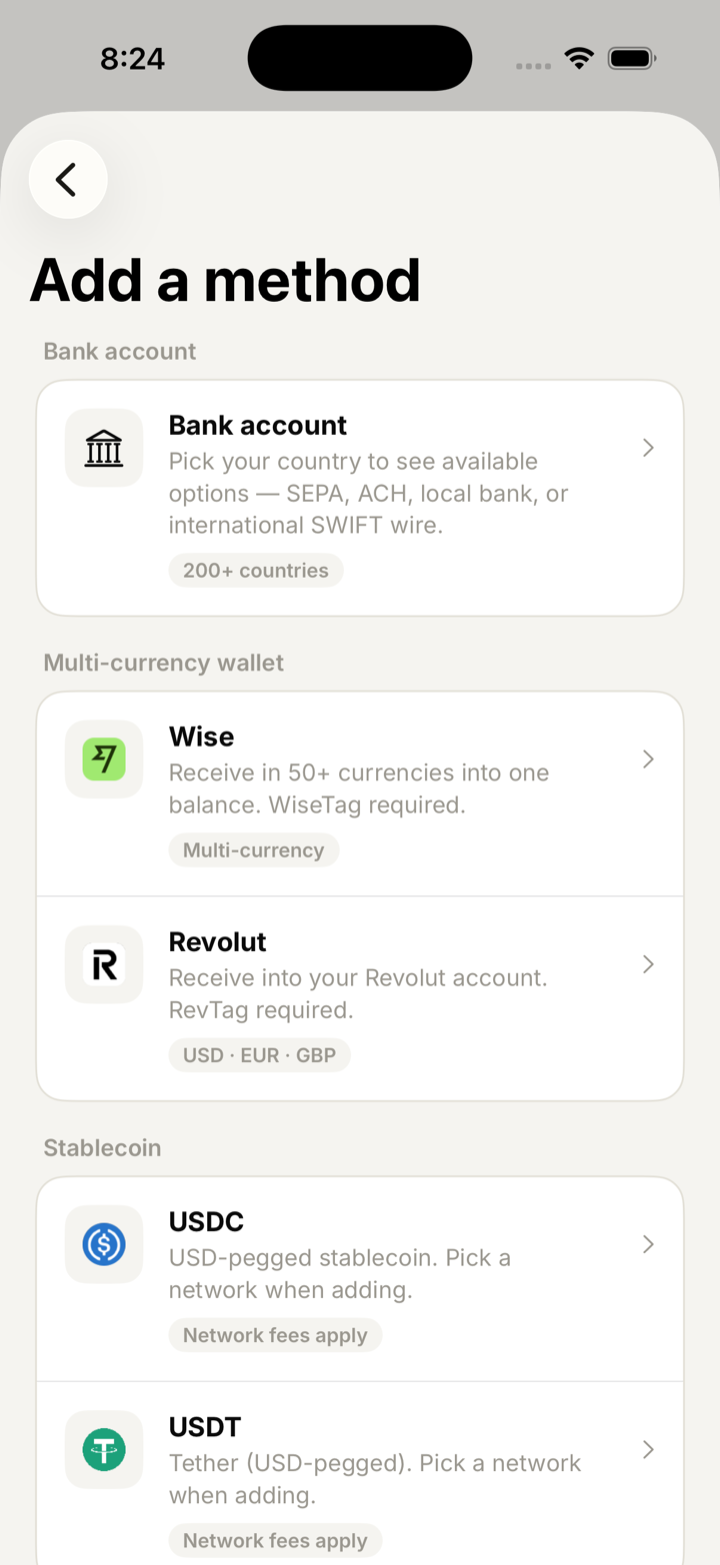
To a bank account (SEPA, ACH, US wire, local or SWIFT), Wise, Revolut, or USDC/USDT on Ethereum, Polygon, Arbitrum, Optimism or Base.
Payout methodsOne flat fee
€50, $50 or £50 per paid invoice, in the invoice's currency. Never a percentage, never a subscription.
Pricing
01 · No company needed
Your client gets a company invoice.
You don't need a company.
Remote Talent LLC, a Wyoming company, issues every invoice on your behalf. The document reads Issued by Remote Talent LLC, on behalf of you — with your name, your work and your rate — and your client pays Remote Talent LLC.
A three-party Service Agreement
You, your client and Remote Talent LLC on one agreement, e-signed by you and your client. Rate, scope and notice are settled before the work starts.
What an accounts team expects
Numbered invoices from a registered company, VAT and reverse-charge wording where it applies, and a payment receipt when the money arrives.
You stay independent
You keep working as an individual. Declaring your income and paying tax where you live is still yours to do — Remote Talent issues the paperwork, not tax advice.
02 · Clients pay any way
Your client pays
the way they prefer.
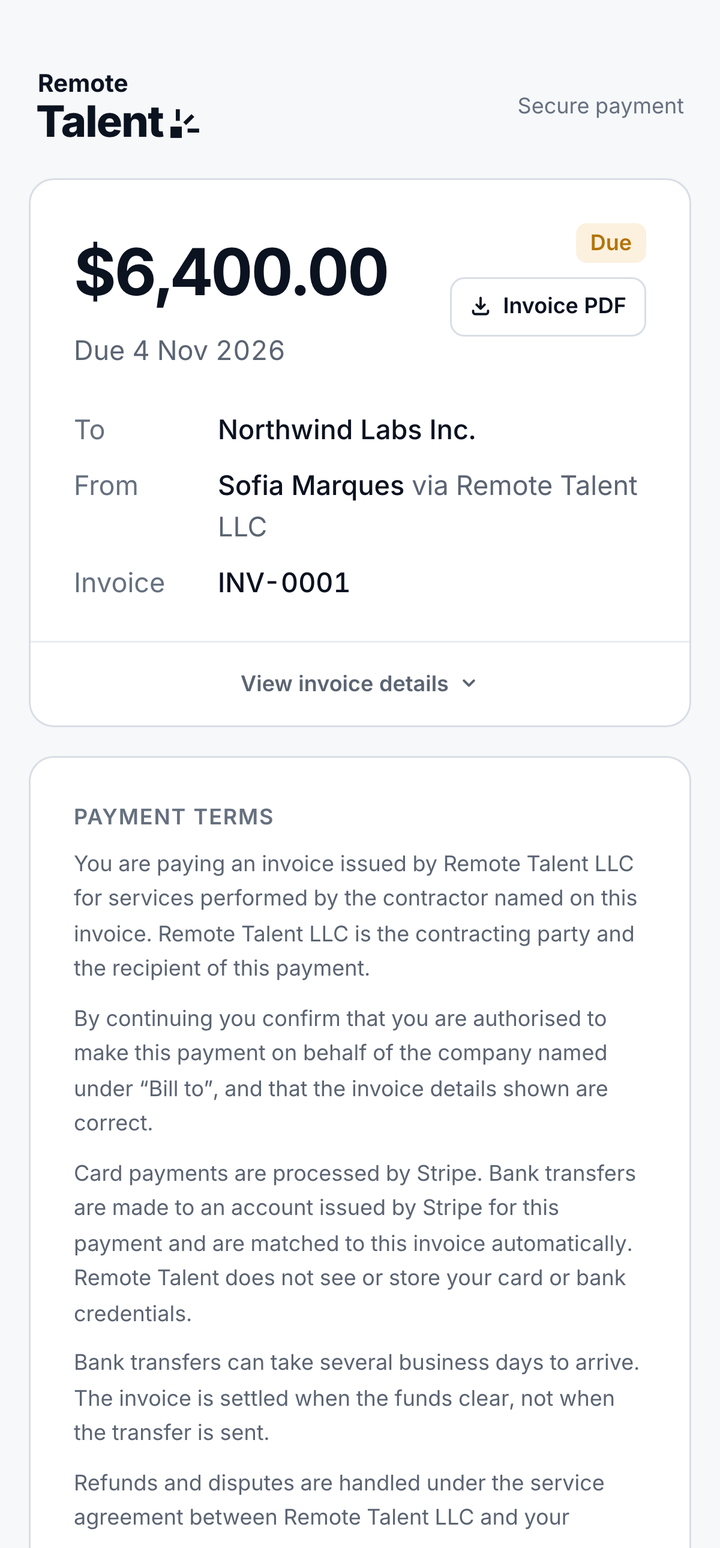
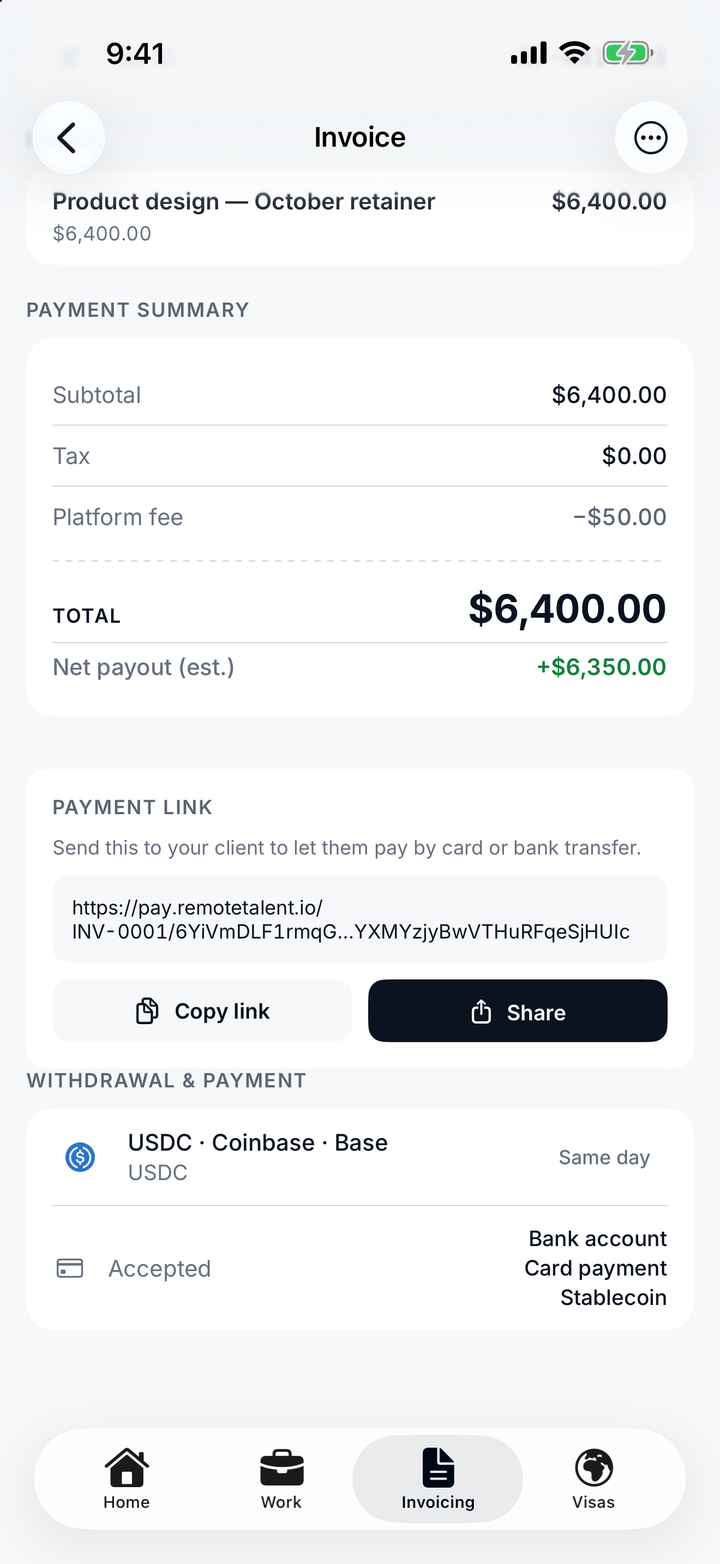
Every invoice comes with a secure payment link, emailed to your client. They open it on pay.remotetalent.io, accept the payment terms and pay by bank transfer, card or USDC — no account needed. You choose which methods each invoice accepts.
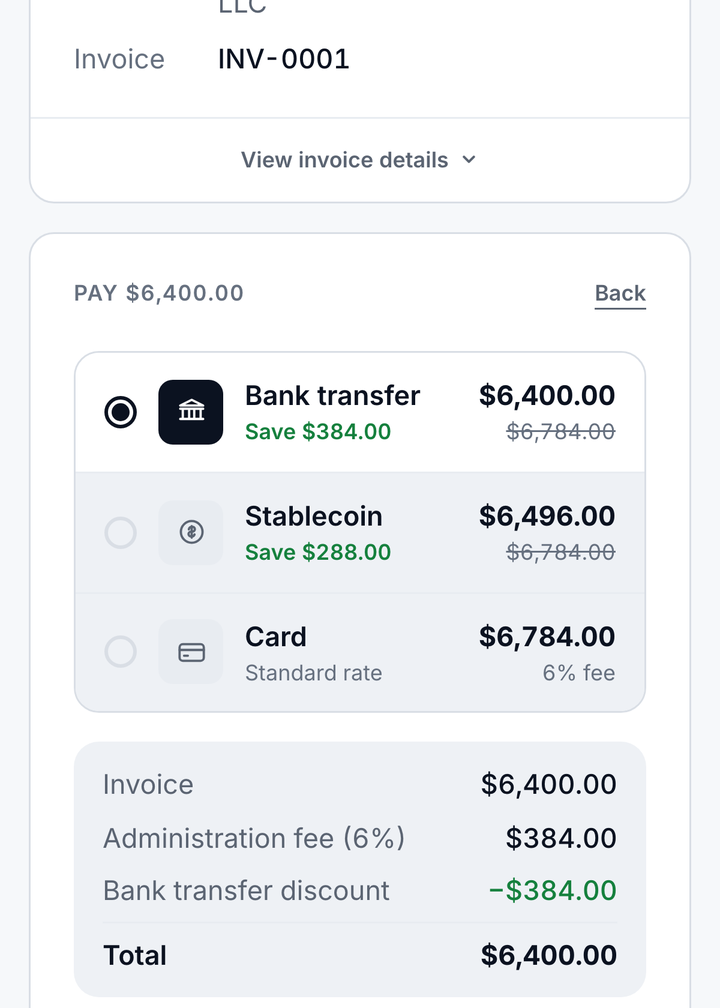
Bank transfer
No administration fee
Your client transfers to bank details issued for that invoice, and the payment is matched to it automatically.
Card
Pay in a minute, by card
Processed by Stripe on EUR, USD and GBP invoices. A 6% administration fee is added on top of the invoice for your client.
Stablecoin
USDC, for dollar invoices
On USD invoices up to $10,000. A 1.5% administration fee is added on top of the invoice for your client.
Administration fees are paid by your client, never taken from you. They are added on top of the invoice at checkout. Your payout is the invoice total minus the flat 50 — whichever way your client pays.


03 · You get paid your way
Get paid the way that
works where you are.
Pick where each invoice pays out — a bank account, Wise, Revolut or your crypto wallet — and change it whenever you move. Once your client has paid, Remote Talent sends your payout there.
Bank account
The one that always works
Pick your country and we show the rails that exist there — SEPA for the euro area, ACH and domestic wire in the US, local bank transfer, or an international SWIFT wire anywhere else.
Wise & Revolut
By WiseTag or RevTag
Send payouts straight to your Wise or Revolut account using your WiseTag or RevTag — no IBAN to re-enter every time you change country.
Stablecoin
When the banking rail is the problem
Take payouts in USDC or USDT to your crypto wallet, on the network you already use. Pick the chain when you add the wallet — no US bank account needed.
Your client pays
Bank transfer, card or USDC, from the payment link in their invoice email.
Client paid
The payment is confirmed, the invoice moves to Client paid, and the flat fee is deducted.
Payout sent
Remote Talent sends your payout to the method on that invoice, with a transfer receipt.
The fee never comes out of your pocket. A flat 50 in the invoice's currency is deducted from the payment when your client pays — drafts, clients and contracts cost nothing. Any card or stablecoin administration fee is paid by your client, on top of the invoice.
Fifteen wallets and exchanges, five networks.
Pick the chain, not the workaround
Ethereum, Polygon, Arbitrum, Optimism or Base — chosen when you add the wallet, and named on every payout as "USDC · Base", never just "USDC".
Custodial or self-custody, your call
Coinbase, Binance, Kraken, Bybit, OKX, Bitstamp, Gemini, Crypto.com — or MetaMask, Trust, Phantom, Rainbow, Ledger and Trezor.
Guardrails, because transfers are final
The app names the network on the confirmation, warns before you save, and keeps a display name so you never send to the wrong wallet.
Watch it arrive
Each invoice shows when your client paid and when the payout is on its way — updated live, without a refresh.


04 · One flat fee
One flat fee.
Only when you're paid.
No subscription. No per-seat charge. No percentage chewing into your rate. Whether you bill $500 or $50,000, the fee is the same.
Per paid invoice
€50 EUR · $50 USD · £50 GBP
Charged in the invoice's own currency, and only when your client pays. The fee is deducted from the payment, never billed to you — no upfront charge, no monthly bill.
- Unlimited clients, contracts and drafts
- Invoices in EUR, USD and GBP, issued by Remote Talent LLC
- Clients pay by bank transfer, card or USDC
- Payouts to a bank, Wise, Revolut, USDC or USDT
- EU VAT, reverse charge and VAT number checks
- E-signed Service Agreements and terminations
- Time tracking with a Lock Screen timer
- Earning certificates, statements and nomad visa checks
Google Play
They take a percentage. We take a flat fee.
Most billing tools charge a share of every invoice — which is a tax on raising your rates. The bigger the invoice, the more a percentage costs you, and the more a flat fee saves you.
| Provider | Pricing | Fee on a $2,000 invoice |
|---|---|---|
| Remote TalentYou | 50 flat | $50.00 |
| xolo.io | 5% commission | $100.00 |
| ruul.io | 5.99% per invoice | $119.80 |
On a $2,000 invoice you keep up to $69.80 more — and the gap widens with every dollar you bill. Public list pricing, April 2026.
Your client's side. Bank transfer adds nothing. Card adds a 6% administration fee and USDC 1.5%, both paid by your client on top of the invoice — never deducted from your payout.
The app
One screen,
the whole business.
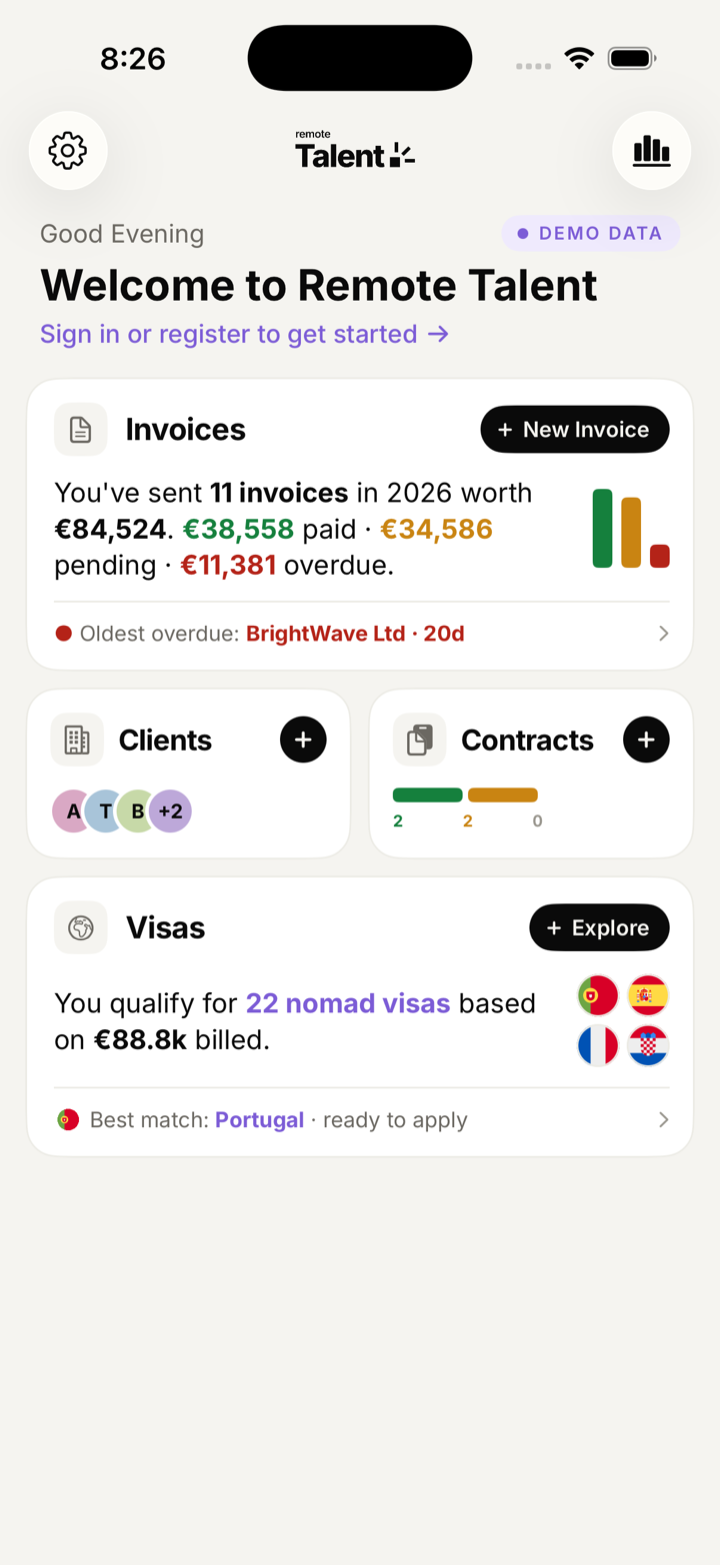
Open the app and the answers are already there: what you are still owed, what came in this month, how the year is going, and where each invoice is on its way to you.
What you're owed, in one figure
Outstanding across every currency, converted at today's indicative rate and marked as approximate — currencies are never silently added together.
The year to date, on one bar
Received, outstanding and overdue, side by side — with the month's paid and overdue totals above it.
Every invoice, on its way
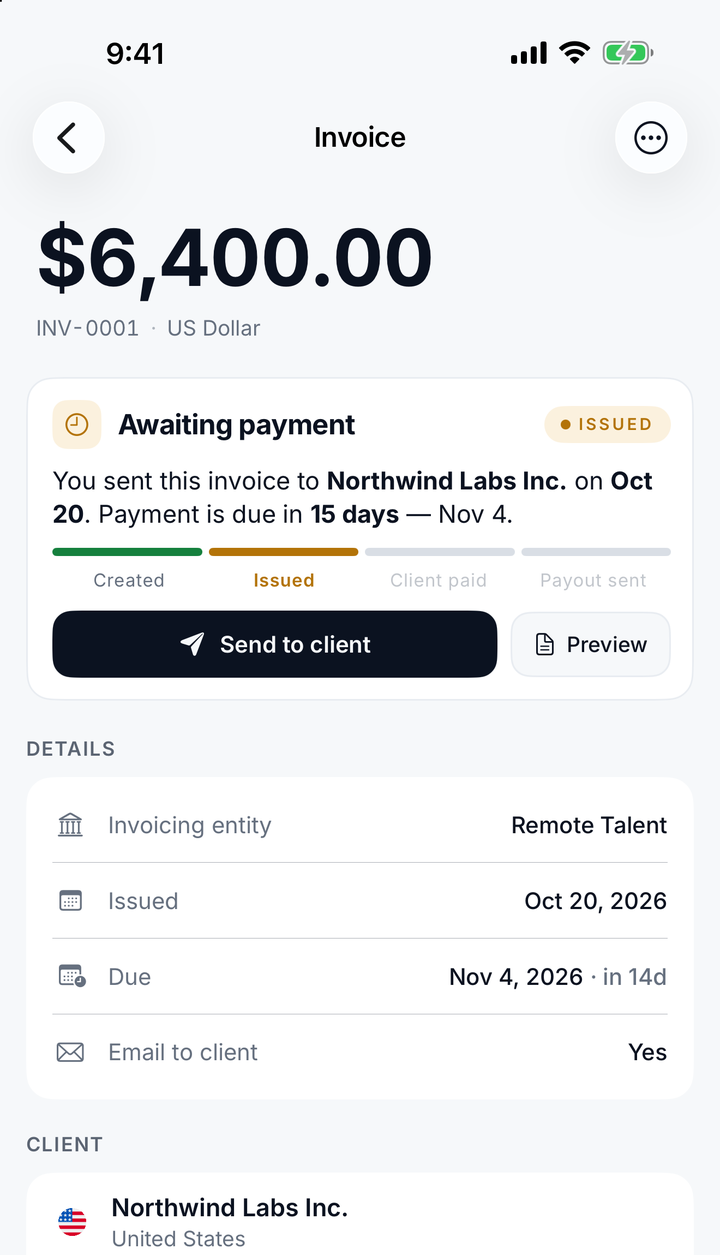
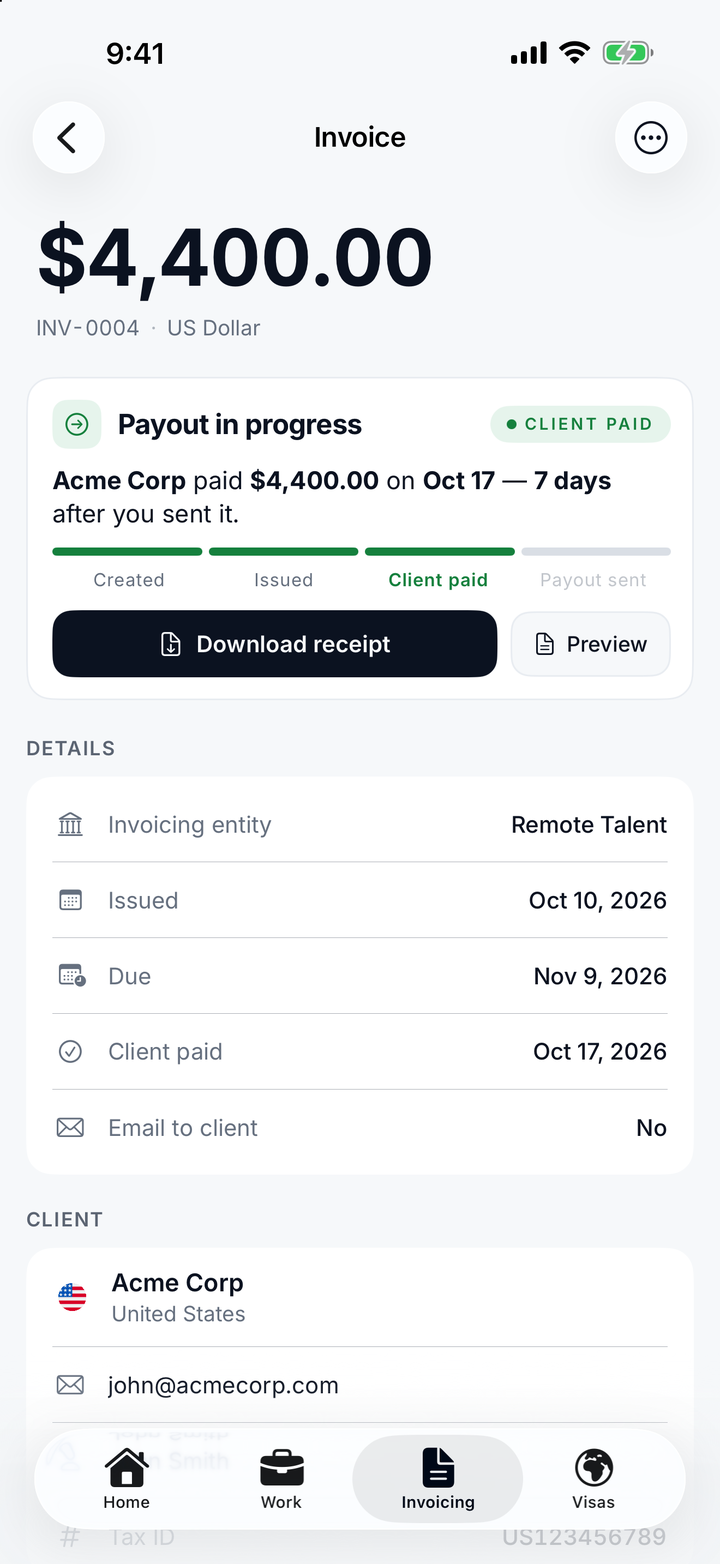
Recent invoices show exactly where they are — created, issued, client paid, payout sent — and update live as it changes.
Locked with Face ID
The app covers its contents whenever you switch away, and Face ID lock switches on once you are verified or have saved a payout method.
Invoicing
A proper invoice,
in about a minute.
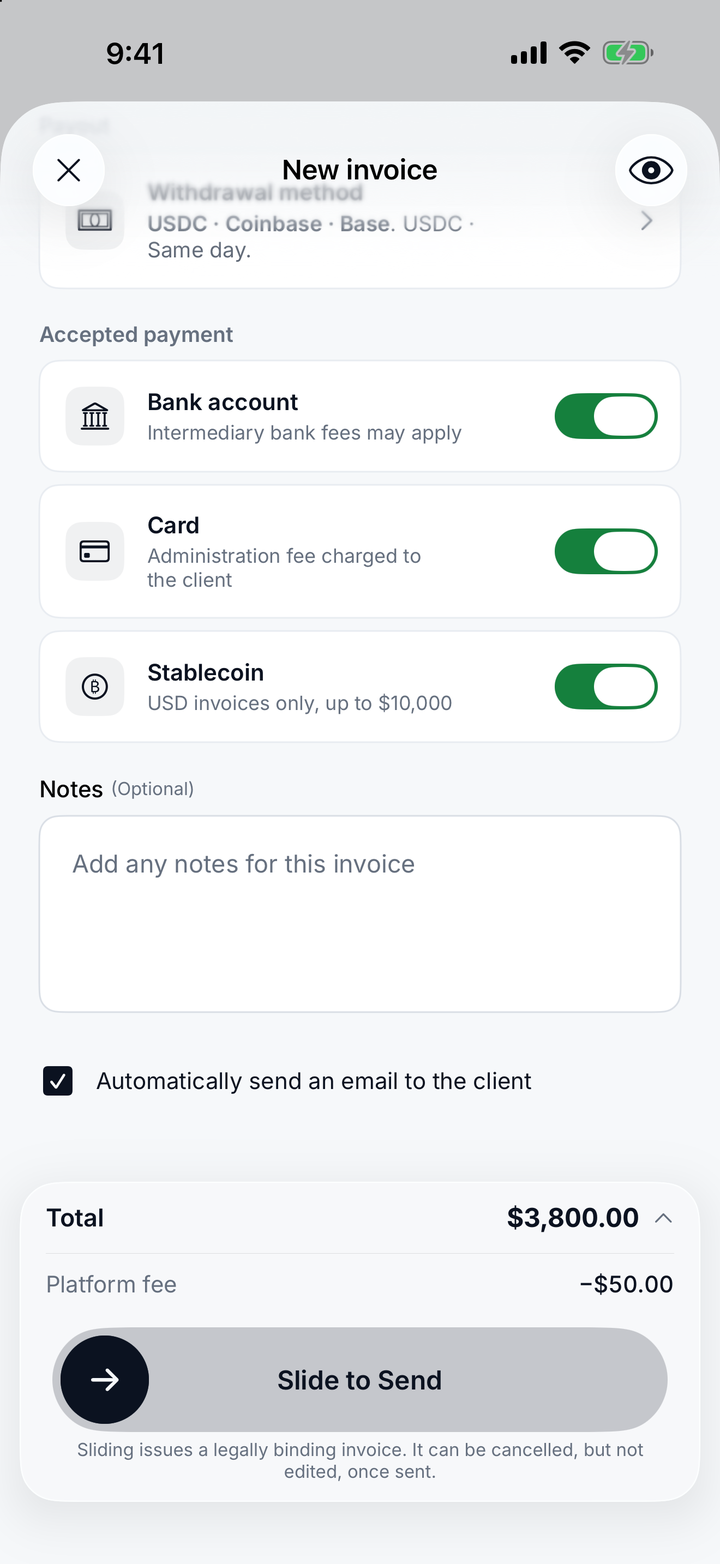
Pick a client or pull the terms straight from a signed contract, add the line items, choose how your client may pay and where your payout goes — then slide to send. Your client gets the invoice and a payment link by email.


Euros, dollars or pounds
Bill in EUR, USD or GBP. The invoice, the payment page and the receipt all keep that currency, from first draft to payout.
VAT and reverse charge, worded correctly
Add your VAT number once. Cross-border EU B2B invoices carry the reverse-charge wording automatically, and client VAT numbers are checked before they go on the document.
Live status, start to finish
Created, issued, client paid, payout sent — each stage timestamped, and updated live in the app the moment it changes. You know your payout before you ask.
Chase less
Overdue invoices are surfaced on the home screen with the client and how many days late, not buried in a list you have to remember to open.
Time tracking NEW
Your timer, on the
Lock Screen.
Start a timer against a contract and it stays on your Lock Screen and in the Dynamic Island. Pause, resume or stop it without opening the app — and when the month is done, the hours go onto the invoice.
Lock Screen and Dynamic Island
The client, the contract and the running clock, always one glance away, with pause and stop controls right there.
Works without signal
Hours are saved on your iPhone first and sync when you are back online, so a flight or a patchy café connection loses nothing.
The hours your client sees
Attach the month's timesheet to an invoice and the hours appear on the client's payment page. Once invoiced, the timesheet is locked, so the hours always match what was billed.
Clients & contracts
Agreements both sides
actually sign.
One three-party Service Agreement — you, your client and Remote Talent LLC — sent from your phone and e-signed by you and your client, with the rate and scope written down before the work starts.
Rates the way you actually charge
Hourly, daily, monthly or fixed price. Set a weekly hour cap, a billing frequency, and either an end date or an ongoing term.
Signed by you, then your client
Waiting on you, waiting on your client, active, ended. Every contract shows exactly where it is, and your client signs by email — no account needed.
Ending it is part of the product
Termination is a real flow with its own signatures and document — not an email you have to write yourself at the worst possible moment.
Clients kept properly
Company details, contacts, tax ID and billing address in one record, with VAT numbers checked, reused on every invoice and agreement.
Service Agreement · SA-0007
Product design retainer
Three parties, one agreement. Rate, scope, notice period and payment terms are settled before the first invoice.
Nomad visa support
Your invoices are
the evidence.
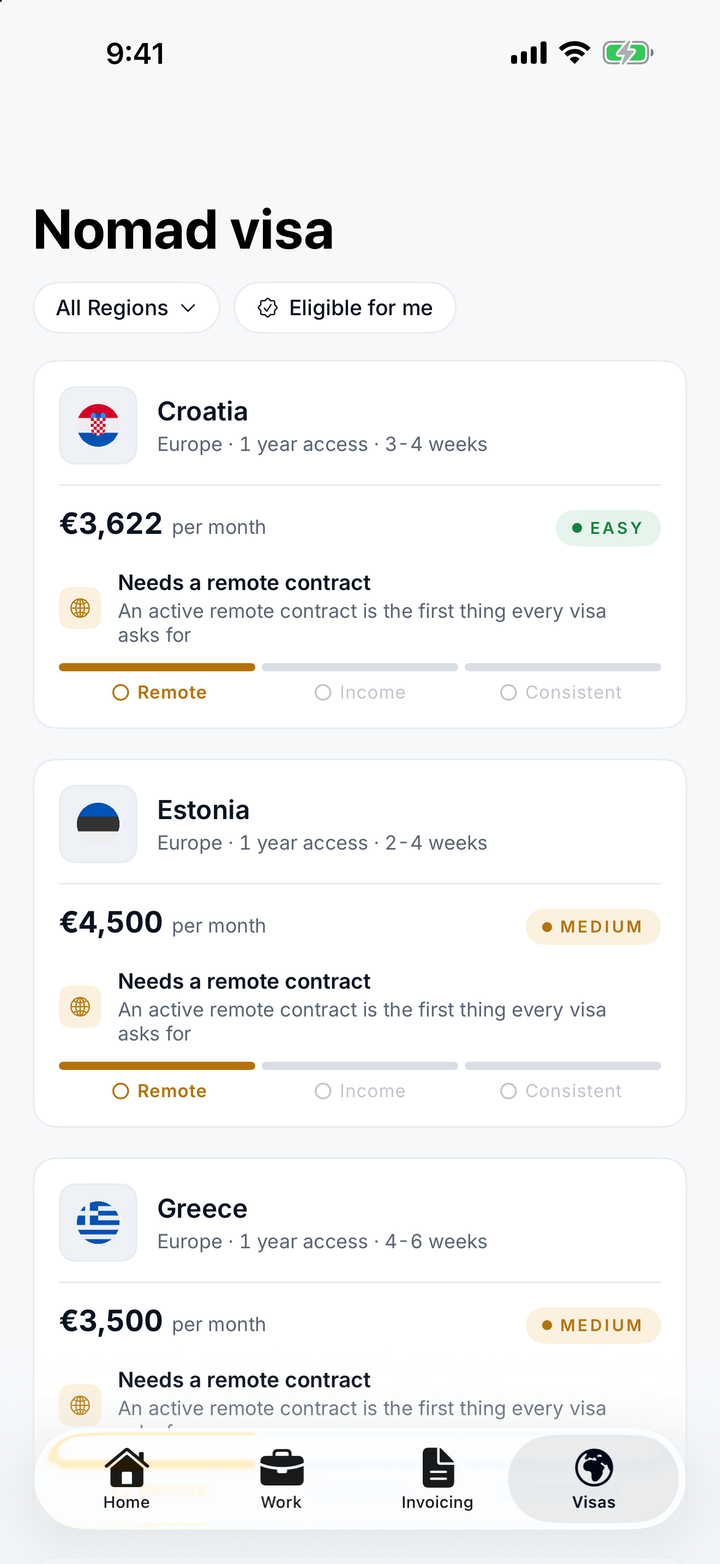
Nearly every nomad visa asks the same question: can you prove a steady income from outside the country? You have already answered it — every invoice you have sent through Remote Talent is part of the file. We check your billing history against each programme's thresholds and tell you where you stand. Remote Talent doesn't process or sponsor visas — it helps you see where you qualify and what to prepare.

The income test, actually calculated
Average monthly income across the last three months, converted to the programme's currency and shown against the threshold — not a number you have to work out yourself.
Consistency, month by month
Most programmes want each month to clear the bar, not just the average. Every month is checked separately and shown with its surplus or shortfall.
Remote contracts count
Active agreements with clients outside the country are exactly what consulates ask to see. They are already in the app, already signed, already dated.
Then the boring part
Fee, processing time, official portal, document checklist and an honest difficulty rating for each programme. Researched, not scraped.
All 16 programmes, with the numbers.
Sorted by the monthly income each one asks for. Tap any country for requirements, application steps and what the consulate expects.
Proof of income
Numbers you can hand
to a bank.
Working for yourself means periodically proving that you do. Remote Talent keeps the year in one place and exports it in a form a landlord, a consulate or a mortgage adviser will accept.
Earning certificate
A formal statement of what you were paid over a period, issued by Remote Talent LLC — the document to attach to a visa, tenancy or mortgage application.
Invoice statement
The fuller breakdown — invoice by invoice, client by client, with dates, statuses and amounts. PDF or CSV, for you or your accountant.
Paid, pending, overdue — separated
Analytics keeps money received apart from money invoiced, so a big month that hasn't been paid yet is never mistaken for money you have.
A receipt for every payment
Each paid invoice comes with a payment receipt, and each payout with a transfer receipt — the paper trail an accountant asks for.
Earning certificate
Sofia Marques
Amounts are what clients paid, in the currency you choose for the certificate. Converted figures are labelled as such.
FAQ
Questions, answered.
Invoice like
a company.
No company needed. Clients pay by card, bank transfer or crypto, and you get paid your way — for one flat fee per paid invoice. On iPhone today; Android and web are next.